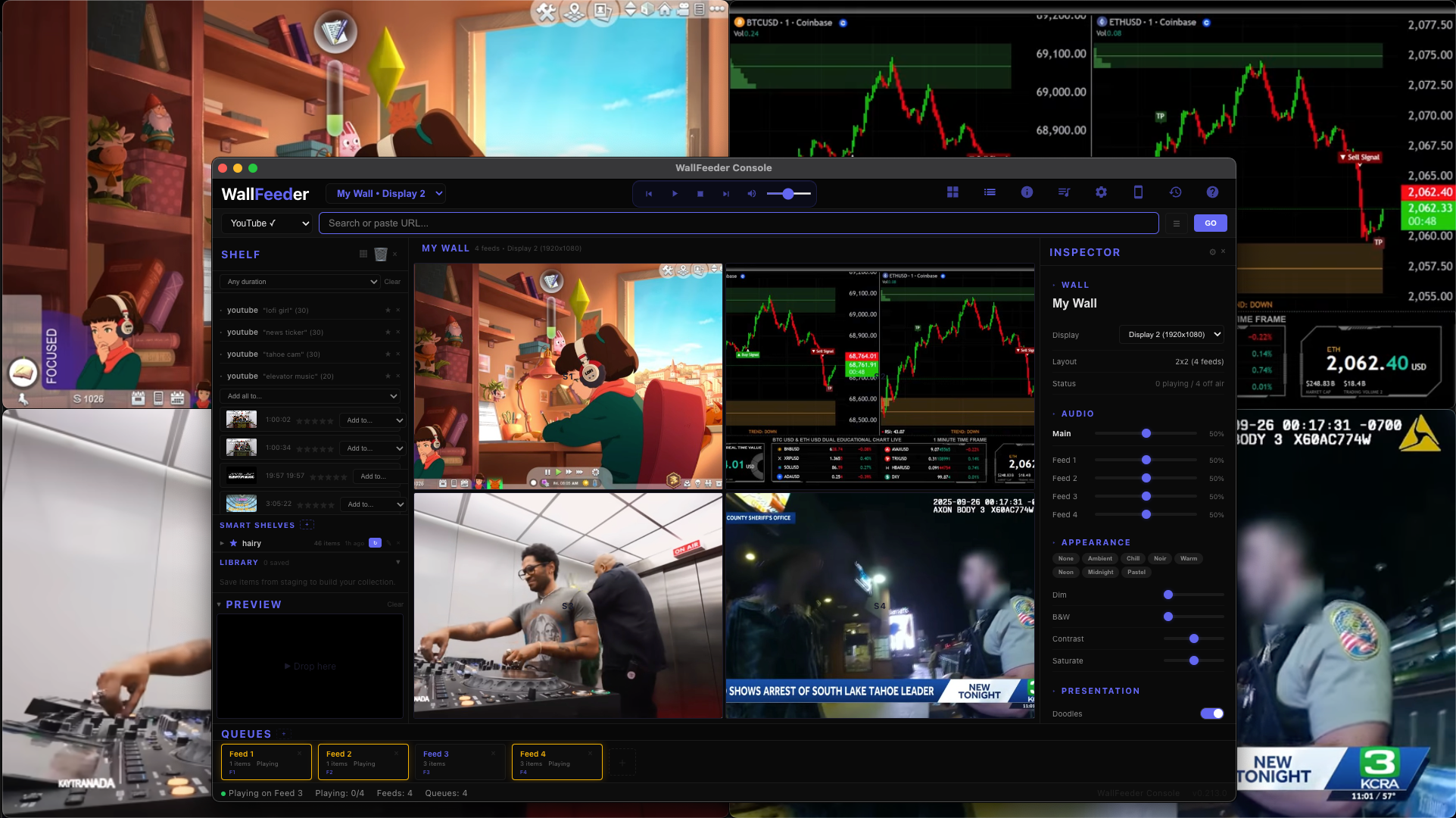
The internet is full of streams.
But controlling them is chaos.
Sports. YouTube. Live cameras. News channels. Dashboards.
To watch them together you end up with:
- dozens of browser tabs
- multiple windows
- no shared control
- no way to orchestrate them on one screen
The web was never designed to behave like a control room.
WallFeeder turns any screen into a
stream director for the internet.
Bring feeds in from anywhere.
Arrange them into a wall.
Queue content for each feed.
Control the entire system from one console.
Your screen becomes a live environment, not just another video player.
Build your wall
A programmable grid of live feeds, controlled from one place.
Build Your Wall
Turn any display into a programmable grid of feeds. Move streams anywhere. Rearrange instantly. Run multiple queues at once.
Search & Discover
Search across streaming platforms directly from the console. Preview videos. Paste playlists. Drop in URLs. Add anything to your wall in seconds.
Queue & Orchestrate
Each feed runs its own queue. Shuffle, loop, auto-advance. Rate content to train your discovery feeds. You're directing what happens on the wall.
Phone Remote
Scan the QR code. Your phone becomes a live remote for the wall. Anyone on the network can join and control feeds. No app required.
Feed anything
WallFeeder pulls streams from across the internet. If it can stream, it can feed the wall.
YouTube
Twitch
Kick
TikTok
Facebook
Instagram
Vimeo
Dailymotion
Rumble
Pluto TV
Tubi
Plex
IP Cameras
HLS Streams
Any URL
Designed like a broadcast console
WallFeeder borrows ideas from professional control rooms. Feeds come in from anywhere. Queues decide what plays next. The console directs the wall. Except instead of TV cameras, your sources are the entire internet.
Per-feed audio
Every feed has its own volume. Solo one feed to hear only it. You're the mixer.
Spotlight & preview
Fullscreen any feed. Preview before sending to the wall. Inline transport controls on hover.
Wall mood
Dim, desaturate, tint, or go noir. Presets for ambient viewing. Make the wall match your environment.
Multi-monitor
Span the wall across multiple displays. Each monitor becomes part of the grid.
Launch a Mode
Turn your wall into an instant environment. Choose a mode and WallFeeder fills the wall with curated streams automatically.
Party Mode
Music videos, DJ streams, trending clips. The wall becomes the party.
Game Night
Multiple games, stats, and sports channels all running at once.
Ambient Wall
Nature cams, lo-fi streams, visuals. Background ambiance for any space.
Studio Mode
Reference streams and music discovery. Your creative workspace.
Modes are powered by discovery feeds and can be customized to your wall.
Built for real environments
Anywhere a screen becomes a shared space.
🏠
Living rooms
Sports, music streams, and ambient content all playing together.
🏅
Watch parties
Multiple games at once. Everyone controls from their phone.
🎤
Studios & workshops
Reference streams, tutorials, and live cameras on one wall.
💻
Multi-monitor setups
Span the wall across multiple displays.
Early Beta
WallFeeder is currently in early beta. We're building it with a small group of users who enjoy experimenting with new tools and helping shape the product as it evolves.
If the idea of a personal internet control room sounds interesting, join the beta and help shape it.
You're in.
Check your email for beta access.